
Consultancy & Automation

Bespoke Workflow Automation & AI Implementation

Stop copying information between systems and chasing updates. We build workflows that do the routine work automatically, flag anything unusual and leave the decisions with your team.

A workflow is a set of steps that runs automatically when something happens: an email arrives, a form is submitted or an invoice lands in the inbox. It picks up the information, updates the right systems and, where it helps, uses AI to read a document or draft a reply. Anything unusual goes to a person.

How we build it

  1. Map the work as it really happens. We follow real examples with the people who do the job, from the moment something arrives to the moment it’s done, and agree which systems the workflow can read or update.
  2. Design the steps. Simple rules where rules will do, and AI where it adds value, such as reading an invoice or drafting a reply. Your team decides which actions need a person’s approval.
  3. Test it on the awkward cases. Not just the normal ones: missing information, duplicate requests and a system that’s down, so it copes on a bad day as well as a good one.
  4. Go live and hand over. Once the agreed tests pass, we support the rollout and show your team how to handle exceptions and keep work moving.

We build in n8n where it fits, connected to the systems you already use, so you can see every step the workflow takes.

What you receive

A working workflow that takes the rekeying and chasing off your team, tested on your real cases before it goes live.

Included

  • A process map. From trigger to output: which systems it reads and updates, and where people decide. Everyone agrees what the workflow does before anything is built.
  • A built and tested workflow, or a working prototype if that’s the agreed first step. It’s tested on normal cases and the awkward ones: missing information, duplicates and system failures. It handles real work, not just the demo.
  • Human review where it matters. Your team decides which actions need approval. AI prepares the work; your people stay in control of what goes out.
  • Acceptance results and a handover. Test results, operating instructions and a walkthrough of how to handle exceptions. Your team can run it, and knows what to do when something unusual comes in.
  • Measures that show the benefit. We agree a starting point, such as handling time, duplicate entry or time to resolve exceptions. You can show the change paid off.
Add what’s useful to you

  • Rollout support. Help with the approved go-live.
  • More workflows. Further workflows once the first one has proved itself.
  • Team training. Learn to look after your workflows with Build Your First n8n Workflows.

Your next step

Every project is quoted after a short scoping conversation. If an AI Readiness Assessment recommended this workflow, up to half of your assessment fee can be credited against the build when you go ahead within 90 days.

Real workflow · in use
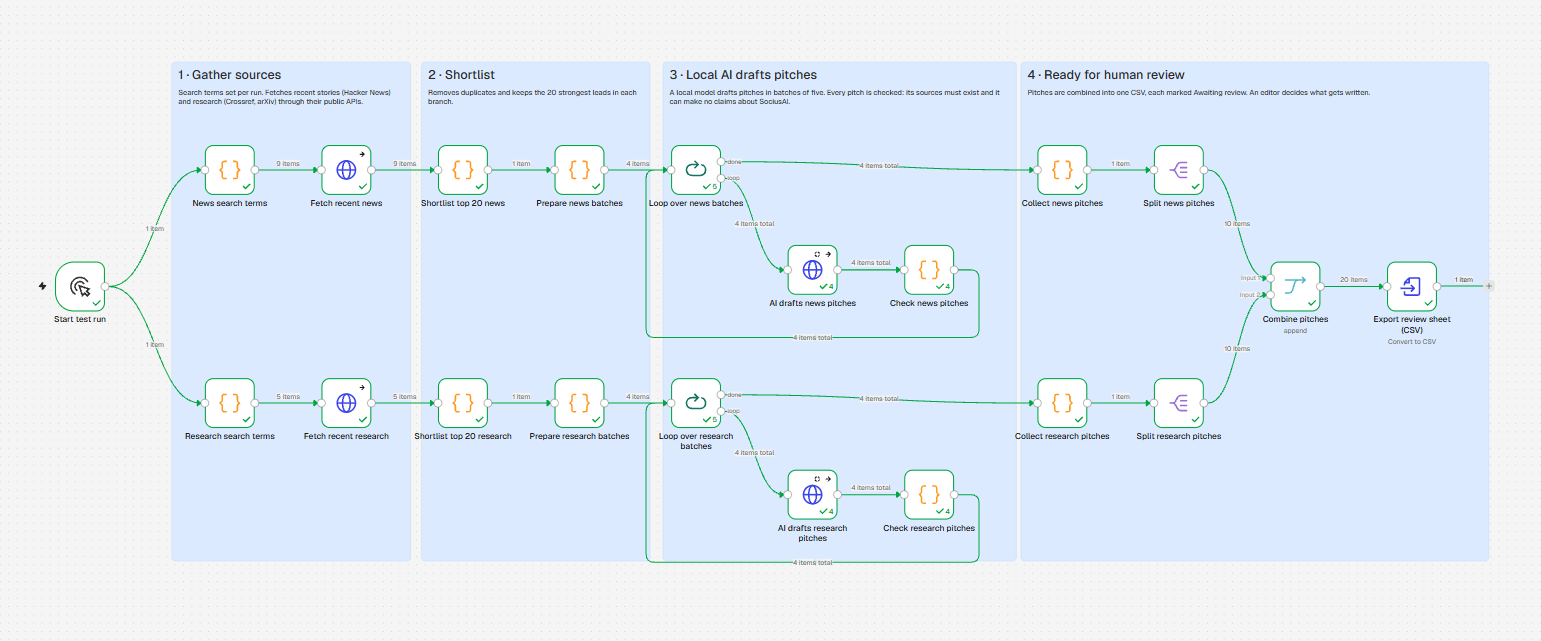
SociusAI n8n workflow: gather sources, shortlist, local AI drafts pitches, ready for human review.
  1. 1

    Gather sources

  2. 2

    Shortlist

  3. 3

    Local AI drafts pitches

  4. 4

    Ready for human review

A workflow SociusAI uses in its own marketing research, run on public sources. Item counts are from one run, not a client result. n8n is a trademark of n8n GmbH.

Explore workflow examples
Example workflow

Finance · Invoice matching

  1. 01

    Email trigger

    New invoice in the finance inbox

  2. 02

    Extract invoice fields

    Supplier, number, PO and amount

  3. 03

    Duplicate and PO check

    Against PO and goods receipt

  4. 04

    All matched?

    Yes · No

  5. 05

    Draft bill

    Created as a draft in your accounts software

  6. 06

    Finance approves

    Posting and payment stay with Finance

  7. 07

    Posted

    Audit trail kept for every invoice

Needs a person

Missing receipt or amount mismatch

Finance resolves · Adds the missing detail or rejects

Measured against your starting point: rekeying time, match rate and time to clear exceptions. Example workflow, not a client result. Live release only after agreed tests pass and Finance approves the rollout.

Sales · From enquiry to quote brief

An email and its attachments feed a sales tracker. The workflow checks for duplicates, reads approved capacity information and prepares a brief with links to the source records. Staff resolve missing or conflicting details. The estimator checks the specifications, sets the price and decides whether to quote.

Finance · Invoice matching

An invoice arrives in the finance inbox. The workflow reads agreed fields, checks the invoice for duplicates and compares it with the purchase order and goods receipt. It prepares a draft record for Finance. Missing receipts or mismatched amounts go to an exception queue. Finance approves posting and payment.

Customer service · Support triage

An enquiry creates or updates a helpdesk ticket. The workflow looks up the account, checks for an open issue and suggests a category and priority. Clear matches go to the right queue. Uncertain or sensitive cases go to a person. The support team checks the draft response before it goes out.

How we measure the result

We agree the starting point and what success would look like. In the Northbrook example, 500 enquiries a month and four minutes less handling time per enquiry would release about 33 staff hours a month. The pilot would measure the actual time, including review, and check that brief accuracy and exception handling are acceptable.

Related services

Want a broader view of what to automate? Explore the AI Readiness Assessment. Already using AI and want to check how your safeguards work? Explore the AI Governance Assessment.

Tell us what you want to improve, which tools are involved and what a good outcome would look like. Email hello@sociusai.co.uk.